If you’ve been stuck with a cringey R6 username you picked on a whim back when you first downloaded the game, you’re far from alone. I’ve cycled through three different display names over my 7 years playing Siege, and the process has shifted a lot as Ubisoft rolls out regular updates to their account management system. This 2026 guide walks you through exactly how to change name in Rainbow Six Siege, no matter what platform you play on, plus fixes for the most common snags that pop up during the process.
Pre-requisites Before You Change Name in Rainbow Six Siege (2026 Rules)
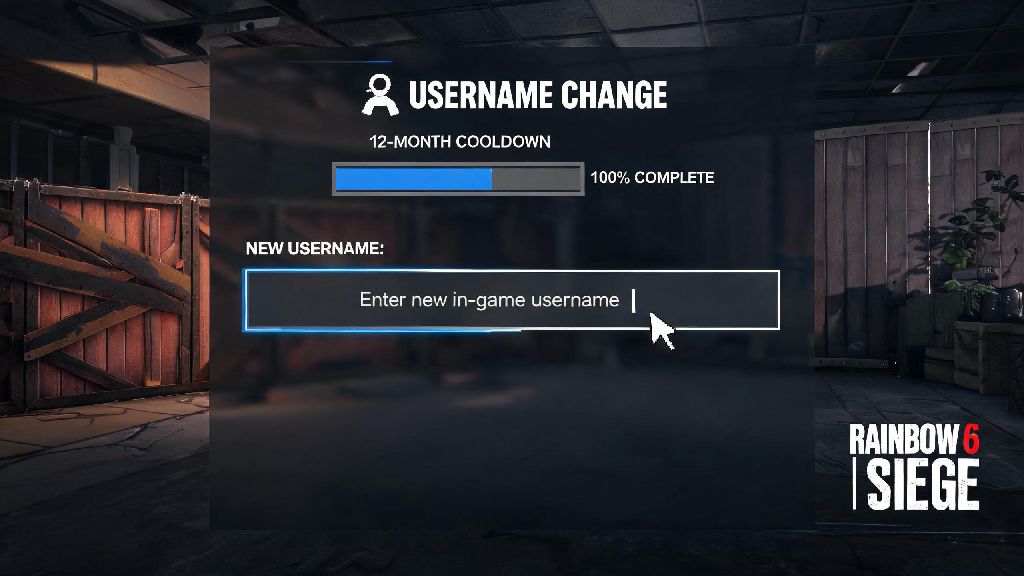
Before you jump into editing your username, there are a few key rules you need to know to avoid wasting your free rename or running into unexpected delays. Free name changes are only available once every 12 months as of Ubisoft’s 2025 account policy update, so you’ll want to be 100% sure of your new name before you submit it. If you need to change your name before the 12-month cooldown ends, you’ll have to pay 1000 Ubisoft Coins, which equals roughly $10 USD, to override the limit.
Your new name also has to follow Ubisoft’s community guidelines to avoid getting flagged. It needs to be between 3 and 15 characters long, and can only include letters, numbers, underscores, and periods. No slurs, hate speech, references to real-world violence, or impersonation of public figures or Ubisoft staff are allowed, and the 2026 automated filter catches far more subtle violations than older versions did. Keep in mind that this name change applies to all Ubisoft games linked to your account, not just Siege, so if you play XDefiant or Assassin’s Creed Shadows too, your display name will update across all those titles.
Step-by-Step Name Change Process for All 2026 Supported Platforms
The exact steps to change your R6 display name vary slightly depending on what platform you play on, but all processes take less than 5 minutes to complete if you have your account login details handy. If you have cross-platform progression enabled, changing your name on your primary linked Ubisoft account will sync across all your connected platforms automatically in most cases, so you won’t have to update each one individually.
If you play on both console and PC, we recommend making the name change directly through Ubisoft Connect first to avoid cross-sync errors. If you change your platform-specific gamertag first, it may take up to 24 hours for the new name to show up in Siege cross-play lobbies.
Common 2026 Name Change Errors and How to Fix Them
Even if you follow all the steps correctly, you might run into a few common errors when submitting your new name. Most of these are easy to fix without reaching out to support, as long as you know what’s causing the issue.
"Name already taken" error: This is the most common error players run into, and Ubisoft stopped releasing inactive usernames as part of their 2025 account security update, so you won’t be able to claim a name that’s already registered to another account, even if that account hasn’t been active in years. Try adding a small variation, like a number at the end or an underscore between words, if your first choice is taken.
"Name violates community guidelines" error: Ubisoft’s 2026 automated content filter is far more sensitive than older versions, and it often flags seemingly harmless meme references, inside jokes, or even common words that have double meanings associated with hate speech. If you get this error and you’re sure your name doesn’t violate any rules, try a slightly different spelling before submitting a support ticket, as the filter will often accept minor variations.
Name not updating in Siege lobbies: If it’s been more than 30 minutes and your old name is still showing up in matches, log out of both Rainbow Six Siege and Ubisoft Connect, clear your game cache, and log back in. If that doesn’t work, double-check that your platform accounts are properly linked to your primary Ubisoft account, as a broken link is the most common cause of sync issues. If the problem persists, you can submit a ticket to Ubisoft support, and they’ll usually fix the sync error within 24 hours.
Is Paying for an Extra Rainbow Six Siege Name Change Worth It in 2026?
If your 12-month cooldown isn’t up yet but you want to change your name immediately, you have the option to pay 1000 Ubisoft Coins to skip the wait. Whether this is worth it depends entirely on your situation, and there are a few key pros and cons to consider before you spend your coins or real money.
Pros of paying for an early change: If your current name is attracting toxic comments from other players, or you’re rebranding to join an amateur esports team for the 2026 R6 competitive circuit, it’s a small cost to fix a big frustration. You can also earn Ubisoft Coins for free by completing weekly in-game challenges across all Ubisoft titles, so if you have a stockpile of coins saved up, you won’t have to spend any real money at all.
Cons of paying for an early change: The 12-month cooldown resets after you pay for a name change, so you won’t be able to change your name again for another full year, even if you pay a second time. I’ve had multiple friends waste 1000 coins on a silly meme name they got tired of after two weeks, so it’s worth waiting at least a week to make sure you actually like your desired new name before you pay to skip the cooldown. If you can wait for the 12-month period to end, you can save your coins for premium battle pass skins or other in-game content instead.
At the end of the day, learning how to change name in Rainbow Six Siege is a simple process once you know the 2026 rules and platform-specific steps. Take a minute to double-check your desired name against Ubisoft’s guidelines before you submit it, so you don’t waste your free annual change or your hard-earned Ubisoft Coins on a name that gets rejected. If you run into any issues that aren’t covered here, Ubisoft’s 2026 support portal has a dedicated section for account name issues that usually resolves problems within a day. Happy queuing, and enjoy your new in-game name.