You’re hyped to squad up for a night of ranked Rainbow Six Siege, but your best friend plays on Xbox while you’re on PS5. The first question that pops into your head is can rainbow six siege crossplay work between your two devices? Crossplay has become a standard feature for most modern multiplayer games, but Siege’s rollout has been a bit slower and more nuanced than many players expected. I’ve spent the last three years playing Siege across PS5, PC, and Amazon Luna, so I’ve sorted through all the official rules, common bugs, and workarounds to make this guide as actionable as possible. Whether you’re a casual player just looking to mess around with friends or a ranked player worried about crossplay affecting your MMR, you’ll find all the answers you need here.
Can Rainbow Six Siege Crossplay Work Across All Platforms?
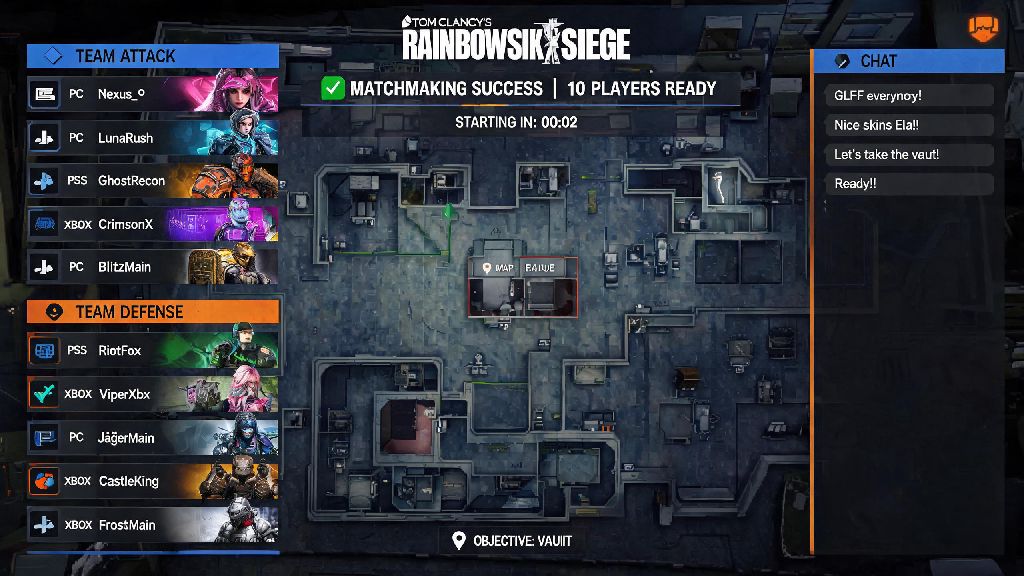
The short answer is yes, but with very specific limitations that Ubisoft put in place to keep matches fair for all players. If you’ve been wondering can Rainbow Six Siege crossplay work between PS5 and Xbox Series X, the answer is a resounding yes. All console players, regardless of brand or generation, are pooled together for matchmaking. That means PS4, PS5, Xbox One, and Xbox Series X/S players can all squad up and play against each other with no restrictions for casual, unranked, and ranked play.
PC players have a very different experience, though. PC players are only matched with other PC players, with no option to join console lobbies, even for custom games. This rule applies to all PC launchers including Steam, Epic Games Store, and Ubisoft Connect, plus cloud gaming services that stream the PC version of the game like Amazon Luna. Ubisoft has repeatedly stated this split is permanent, as they want to avoid the input advantage mouse and keyboard players have over controller users.
Console players can play with anyone on PlayStation or Xbox, regardless of generation, so you don’t have to worry about upgrading to the latest console to play with friends who already made the jump. Cross-progression is also supported across all console platforms as long as you link the same Ubisoft account to all your devices, so you can keep all your unlocked operators, skins, and MMR when you switch between your PS4 and PS5, for example.
How to Enable Crossplay in Rainbow Six Siege for Your Platform
Crossplay is enabled by default for all new players, but if you turned it off in the past to avoid playing against users on other platforms, you can turn it back on in just a few steps. A lot of players new to the feature run into issues when they first test if can Rainbow Six Siege crossplay works for their group, because they skip over small setup steps that are required for invites to work. Follow these steps to make sure crossplay is active on your account:
- From the main menu, open the settings menu by clicking the gear icon in the top right corner of the screen
- Navigate to the "General" tab, then scroll down until you find the "Crossplay Matchmaking" toggle
- Switch the toggle to "On" to enable crossplay, or "Off" if you only want to play with users on your exact platform
- Save your settings and restart your game if prompted to make sure the change takes effect
Even with crossplay enabled in-game, you might still run into issues sending invites to friends on other platforms. You will need to add friends via their Ubisoft ID, not their PSN or Xbox gamertag, to send crossplay squad invites. You can find your own Ubisoft ID by clicking your profile icon in the top right corner of the main menu, and you can search for other users’ IDs in the Ubisoft Connect friends tab. Some console players also have crossplay blocked at the system level, so if you still can’t send invites, ask your friend to check their platform’s privacy settings to make sure crossplay is allowed for third-party games.
Key Crossplay Restrictions You Need to Know Before Queuing
While crossplay works great for most casual and ranked play, there are a few hard restrictions you need to be aware of before you group up with friends. The biggest one applies to competitive play: Crossplay is disabled for all tournament and esports lobbies, to keep the playing field even for players competing for prizes. If you’re signing up for an official Siege tournament, you’ll only be able to play with other users on the exact same platform as you, even if you have crossplay enabled in your general settings.
Another important restriction is that crossplay settings can’t be changed mid-session. If you join a squad with crossplay enabled, you can’t turn it off without leaving the squad and backing out to the main menu. You can’t switch crossplay settings mid-session, so make sure you adjust them before you join a squad or queue for a match. I’ve had friends forget to turn crossplay on before joining my ranked squad, and we had to back all the way out of a 10-minute queue to fix it, so it’s always worth double checking your settings before you group up.
Custom game lobbies also follow the same crossplay pool rules as regular matchmaking. That means you can create a custom lobby for all console players, or a custom lobby for all PC players, but you can’t mix PC and console users in the same custom lobby even if you just want to mess around in a private match. Ubisoft has not announced any plans to change this rule, so if you have friends on both PC and console, you’ll need to play on separate accounts to squad up with both groups.
Tips for Smooth Crossplay Sessions With Friends
Even with all the setup done right, you might run into small issues during crossplay sessions that can ruin your fun. The most common issue is broken voice chat, since platform-specific party chats only work for users on the same platform. To avoid this, use the in-game Ubisoft Connect voice chat instead of your console’s party chat, or use a third-party app like Discord that works across all devices. I’ve found Discord is far more reliable for crossplay groups, especially if you have friends playing on different generations of consoles that might have issues with the in-game chat.
Another common issue is high ping when playing with friends across different regions. If you’re playing with friends on the other side of the country, pick a server that’s roughly in the middle for all of you, instead of using the default closest server for the squad leader. High ping won’t just hurt your performance, it can also lead to accidental friendly fire and missed peeks that cost you the round. You can change your preferred server in the same general settings tab where you enabled crossplay.
If you run into a bug where crossplay invites aren’t showing up, the fastest fix is usually to restart your game and make sure you have the latest patch installed. I’ve run into this bug at least a dozen times, and 90% of the time a quick restart fixes it without any extra steps. If the issue persists, you can check the official Ubisoft server status page to see if there’s an ongoing outage affecting crossplay services, which usually gets fixed within a couple of hours.
At the end of the day, the answer to can rainbow six siege crossplay depends entirely on what platforms you and your friends use. Console players get full crossplay across all PlayStation and Xbox devices, while PC players are limited to other PC users. Ubisoft’s restrictions are designed to keep matches fair for everyone, even if they are a bit frustrating for players who want to squad up across PC and console. As long as you follow the steps to enable crossplay, add friends via Ubisoft ID, and adjust your settings before you queue, you’ll be able to play with almost all your friends no matter what console they own. If you run into any issues you can’t fix, you can always check the official Ubisoft support page for the latest updates on crossplay outages and bug fixes.